Before sending
Find and review contactable prospects.
Cold outreach software is often judged by sending volume, but deliverability and reputation usually start earlier: with whether the lead belongs in the campaign at all.
Pay only for what you use · $1 = 100 credits · Credits never expire · Zero-result searches refunded
Review the actual search setup and result format before spending credits or starting a campaign.
Find and review contactable prospects.
Use a dedicated email platform for deliverability.
Feed outcomes back into the next niche search.
Use these findings as context, not promised results. Each source includes its sample or method and the limitation that matters when applying it.
In its dataset, the top 10% of representatives generated 4.2 times as many replies and booked 8.1 times as many meetings as average representatives; emails with 51-100 words had the highest reply rate among the displayed length bands.
Across 2025 campaigns, 34,393 replies from 7,530,489 sends produced a 0.45% reply rate; companies with 11-50 employees replied at 0.49% versus 0.22% for enterprises with 10,000 or more employees.
More constrained searches can cost more because they require additional research, contact checking, and drafting work.
If a completed search returns no contactable leads, its search credits are returned automatically.
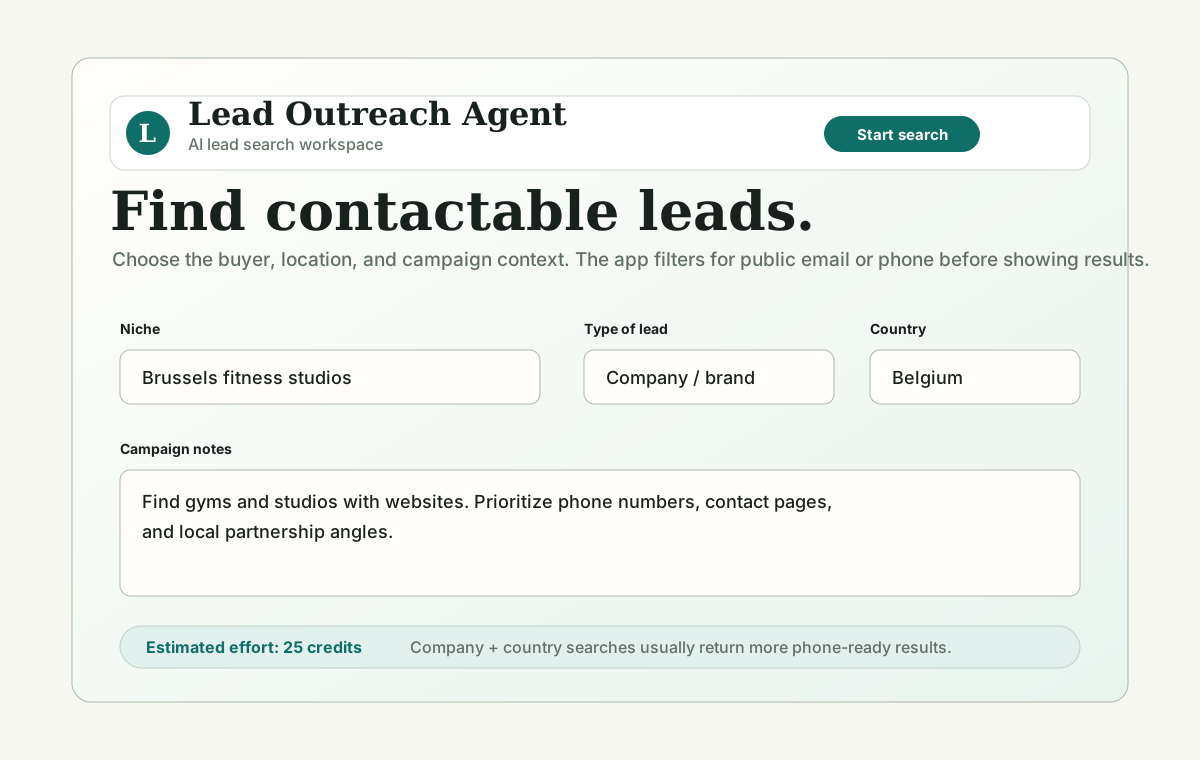
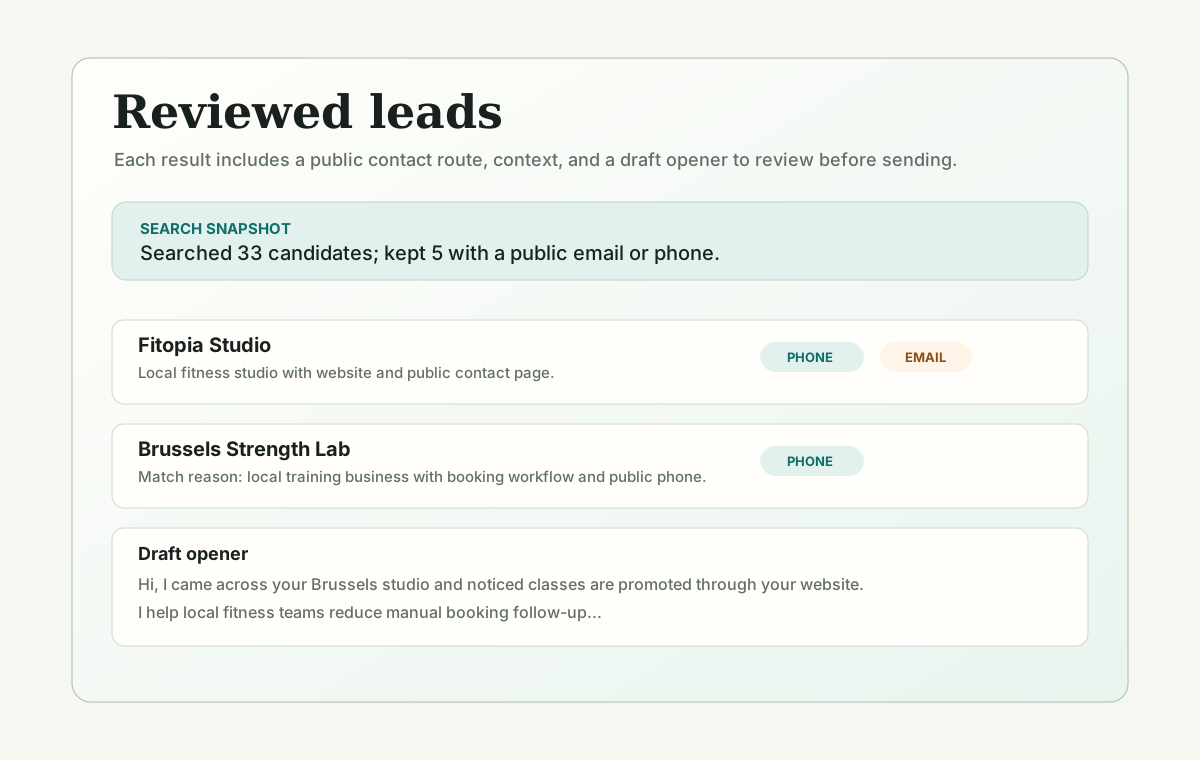
Screenshots show the niche input, public contact routes, match reasons, and editable drafts before you start.
Results need a usable public email or phone number and enough source context for review.
Each result includes context to help you check why the lead fits before outreach.
Drafts remain editable and should be reviewed for accuracy, relevance, and compliance before sending.
Use this comparison to decide whether the workflow fits your campaign before spending credits or time.
| Option | Best for | Tradeoff | Recommended use |
|---|---|---|---|
| Manual research | Learning a brand-new niche | Slow and hard to repeat | Use it for a few examples, then standardize the workflow |
| Large generic database | Known markets and high-volume teams | Can be stale or too broad | Use after validating that the niche and message convert |
| Single-purpose contact finder | Known companies or domains | Does not explain fit by itself | Use when the lead is already known |
| Lead Outreach Agent | Small reviewed searches with public contact routes | Needs human review before outreach | Use for niche testing, local searches, and campaign prep |
A cold outreach stack usually has research, contact checking, message drafting, sending, reply handling, suppression lists, and analytics. Lead Outreach Agent handles the research and draft-prep layer, not inbox warmup or automated sending.
Before any message leaves the sender account, review the lead source, contact route, relevance, country, unsubscribe process, and whether the opener makes a truthful public-data connection.
Use it before the sending tool when you need a small, contactable list and an editable first draft. Export or copy only leads that pass human review.
Before choosing a sending tool, a team checks the input: they run one search, confirm each lead has a real public route and a reason to be contacted, and only then think about sequencing. A clean, relevant list protects deliverability more than any send-time feature.
Before outreach, review the source page, public contact route, business fit, geography, and draft message. Remove any unsupported claim, avoid sensitive assumptions, and make sure the reason for contact is visible from public information.
Many lead generation tools focus on volume. Lead Outreach Agent focuses on whether a lead can actually be contacted from public information. Candidates without a usable email or phone are skipped, and zero-result searches return credits instead of padding the result table with fake matches.
No AI search tool can guarantee sales, consent, deliverability, or complete coverage of the public web. Some niches are naturally hard because contact details are hidden, results are dominated by directories, or the requested country and size filters are too strict. The best use is small, reviewed batches that improve over time.
Teams shop for sending tools when the real risk is upstream. Sending irrelevant mail to a bad list is what triggers spam complaints and tanks a domain's reputation - a problem no warm-up feature or sequencer fixes. The first cold-outreach tool that matters is the one that decides whether a lead belongs in the campaign at all.
This is not an argument against sequencers - once your list is reviewed and relevant, a dedicated sending tool handles follow-ups, unsubscribe handling, and reply tracking better than anything else. The point is order of operations: qualify first here, then send from a tool built for sending, with suppression and opt-outs in place.
Lead Outreach Agent uses site credits for the research and checks behind a search. Focused company searches with clear geography are usually simpler than broad, hidden-contact, or creator-heavy searches. Start with five leads, then scale only if the contactability and fit are good.
Product screenshots show the search setup, progress, kept leads, skipped candidates, public contact route, match reason, and editable outreach draft.
No. It helps prepare reviewed leads and draft outreach; users control sending and compliance.
Bad contacts damage reply rates and sender reputation. A smaller reviewed list is safer than fake volume.
The one that decides whether a lead belongs in the campaign at all. Deliverability and reputation start with a relevant, contactable list - not with the sending tool.
No. It prepares a reviewed list and a first draft; you send from a dedicated tool with suppression lists, unsubscribe handling, and reply tracking. Qualify here, send there.
Start with one narrow search, review the contactability and match reasons, then use the related tools or benchmark pages to decide whether the niche is worth scaling.